Tinder OSINT: extracting profile data from network traffic
Tinder is a mobile-first dating application with limited traditional OSINT surface. However, analysts can still extract meaningful information by examining network traffic sent to the mobile or web client.
Data access and collection
To conduct analysis, use a browser's Network Inspection tool or a web proxy such as Fiddler or Proxyman. During normal browsing, the application preloads profile data through API responses. One commonly observed response is a core.json file containing up to 15 profile cards loaded in advance.
This process does not require interaction with the profiles themselves. The data arrives automatically as part of the application's performance optimization.
Identifiers and metadata
Each profile loads with multiple internal identifiers, including:
- A MongoDB ObjectId, which encodes the user's registration timestamp.
- A secondary internal numeric identifier used by the platform.
- A content hash linked to profile state.
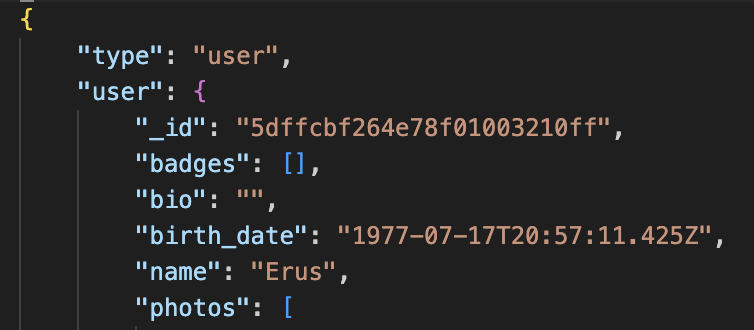
Together, these identifiers allow analysts to infer account age, correlate profiles across datasets, and distinguish between newly created and long-standing accounts.
Determine Tinder profile's registration date
A MongoDB ObjectId is a 24-character hexadecimal string. Its first 8 characters represent a Unix timestamp (seconds since 1 January 1970).
Analytical steps:
- Take the first 8 hexadecimal characters of the ObjectId.
- Convert that value from hexadecimal to decimal.
- Interpret the result as a Unix timestamp (UTC).
This allows analysts to determine when a Tinder account was created, even if the platform does not display that information to users.
Example logic (conceptual):
- ObjectId:
5a7718e8f01e5f122e50061f - First 8 characters:
5a7718e8 - Hex → decimal → Unix timestamp
- Result: account creation date in UTC
This technique is reliable because MongoDB generates ObjectIds server-side and embeds the timestamp by design.
Personal and profile attributes
The captured data typically includes:
- First name
- Birth date, or an explicitly marked fuzzy birth date when the user restricts visibility
- Bio text and badges
- Lifestyle and personality descriptors, such as communication style, habits, and relationship intent
- Distance information, revealing approximate geographic proximity at the time of capture
Even when some fields appear hidden in the user interface, they often remain present in the underlying API response.
Images and biometric metadata
Profile photos arrive in multiple processed resolutions for display. In addition, the data frequently references an original, unprocessed high-resolution image hosted on Tinder's content delivery infrastructure.
Access to these originals relies on session-specific signed URLs. While the links expire, they allow full-resolution viewing without authentication as long as the session key remains valid.
The metadata also reveals automated image handling:
- Face detection bounding boxes
- Cropping coordinates
- Indicators showing algorithmic processing
This information confirms that images undergo server-side facial analysis before delivery.
Practical OSINT value
Without interacting with users or bypassing controls, network traffic analysis can reveal:
- Account creation timelines
- Consistency or obfuscation of age data
- Behavioral and lifestyle indicators
- High-resolution imagery and biometric processing artifacts
- Differences between displayed privacy settings and backend data exposure